Best voice calculator app for iPhone
Only a handful of voice calculator apps for iPhone are still actively maintained. This page compares them on what matters day to day: fixing a misheard number, ads, Apple Watch support and accessibility. We make Simple Voice Calculator, so keep that in mind. The table sticks to things you can check on each app’s App Store page.
Updated · Vito Software, maker of Simple Voice Calculator
On this page
What makes a voice calculator good
Recognizing numbers is the easy part. The useful apps let you speak naturally ("25 plus 17 times 3"), show the full equation as you go, read the answer out, and keep working when your hands are busy. On iPhone, on-device processing, no ads and Apple Watch support matter as much as raw math ability.
Natural voice input
Say equations in plain language instead of rigid commands.
Spoken results
Hear the answer without looking at the screen.
Works offline
On-device speech recognition works without internet.
Accessibility
VoiceOver, Voice Control and high contrast support.
The apps side by side
App Store ratings as of (United States). iOS apps only. Tap a name to open its App Store page.
| App | Platforms | Pricing | Offline | Apple Watch | Dynamic Island | Rating |
|---|---|---|---|---|---|---|
| Simple Voice CalculatorVito Software Our app | iPhone, iPad, Watch, Vision Pro | Free, no ads | Yes | Full app | YesPlus Lock Screen | 4.6 out of 5 206 ratings |
| Voice Calculator - Human speak俐 马 | iPhone, iPad, Mac, Vision Pro | Free with ads + optional Pro | Yes | No | Not mentioned on its App Store page | 4.5 out of 5 1.3K ratings |
| VoiceCalc: AI Voice CalculatorSmashMelon LLC | iPhone, iPad, Mac | Free + lifetime upgrade | PartlyAI features need internet | No | Not mentioned on its App Store page | 4.4 out of 5 90 ratings |
| Voice Calculator with HistoryIqra Hasan | iPhone, iPad, Mac, Vision Pro | Free + premium upgrade | Yes | No | Not mentioned on its App Store page | 5.0 out of 5 2 ratings |
| The Talking CalculatorRoundhouse Software | iPhone, iPad, Mac, Vision Pro | Free + optional ad removal | Yes | No | Not mentioned on its App Store page | 3.2 out of 5 5 ratings |
Swipe the table sideways to see every column. The app name stays in view.
A dash in the Dynamic Island column means the app's App Store page doesn't mention a Live Activity or the Dynamic Island.
Apps with few ratings are often newer, or built for a narrower job.
Where Simple Voice Calculator stands out
Across Apple devices. It runs on iPhone, iPad, Apple Watch and Vision Pro, with a dedicated watchOS app and a watch face complication. Voice recognition uses Apple's on-device speech framework for fast, private processing.
Voice in and out, free, no ads. Voice input, spoken results, the live equation and the Apple Watch app are free. Vito Software doesn't show ads in Simple Voice Calculator.
It keeps counting in other apps. Start talking, switch to your bank app, a PDF or a spreadsheet, and read the numbers out. The app keeps listening in the background, and a Live Activity shows the running total in the Dynamic Island and on the Lock Screen. It's free. See the Dynamic Island guide.
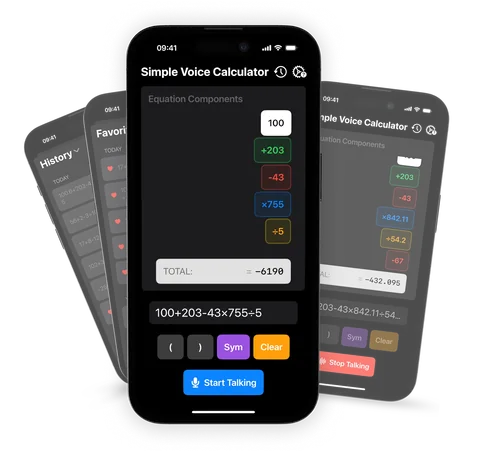
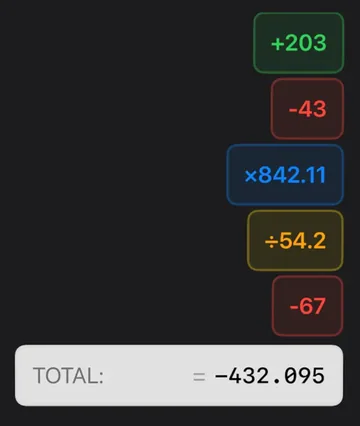
You can see and fix what it heard. As you speak, each number appears as its own block and the total updates live. Tap a block to fix it instead of starting over, which matters when you're adding a long list.
Accessibility. VoiceOver, Voice Control, Dynamic Type and dark mode are all supported. See the accessibility guide for details.
What users say. It's rated 4.6 on the App Store and used by more than 20,000 people. Reviews keep coming back to the same two things: fewer typing mistakes, and adding long lists without looking away from the paper.
Which one to choose
- Simple Voice Calculator if you want offline voice input and output, no ads, a running total in the Dynamic Island while you use other apps, Apple Watch support and solid accessibility on iPhone, iPad and Vision Pro.
- Voice Calculator - Human speak if you want a long-established app with more than 1,250 ratings, automatic history and 30+ languages.
- VoiceCalc if you want AI for everyday questions like bill splitting, unit conversions and "which deal is better".
- Voice Calculator with History if you need to annotate calculations, organize history and export to PDF, Excel or CSV.
- The Talking Calculator if you want a classic talking calculator that speaks each button press, in English and Spanish, for learning or accessibility.
Want to try voice math before installing anything? Use the free online voice calculator.
Questions people ask
What is the best voice calculator app for iPhone?
For most iPhone users who want reliable hands-free math without ads, Simple Voice Calculator is the best voice calculator app. It offers on-device voice recognition, spoken results, Apple Watch support, and a 4.6-star App Store rating.
Are voice calculator apps free?
Many are free to download but show ads or keep some features locked. Simple Voice Calculator keeps core voice features free with no ads. Pro is optional and adds History, Favorites and iCloud sync.
Do voice calculator apps work offline?
Not all of them. Cloud-based AI apps may need an internet connection. Simple Voice Calculator processes speech on-device and works fully offline.
Can I use a voice calculator app on Apple Watch?
Only some apps include an Apple Watch app. Simple Voice Calculator has a dedicated one with instant results and watch face complications.

Simple Voice Calculator
for iPhone.
Free on the App Store, with no ads. Works on iPhone, iPad and Apple Watch. Rated 4.6 out of 5 by more than 200 people.
More guides
Try and learn
- Online voice calculatorTry voice math in your browser, free.
- What to sayEvery phrase the app understands.
- Talking calculatorSpeak it in, hear the total back.
- Siri as a calculatorWhat Siri can do, and where it stops.
- Action button ideas12 useful things to put on it.
- What is 10-key?Ten-key typing, speed and practice.
Use it for