Online voice calculator
Tap the mic, say the sum, hear the answer.
On this page
0
Tap to speak
Speak the whole calculation, then say “done”.
Shortcut: Space to start or finish, Esc to stop.
This browser can’t listen (Firefox doesn’t support it). Open the page in Chrome, Edge or Safari, or type below.
Try one
History
Your answers will appear here. Tap one to keep calculating from it. They stay in this browser only.
Things you can say
Speak the way you would to someone across the table. Words and symbols both work, so typing 12 x 4 or √49 is fine too. It doesn't do logarithms, trigonometry or factorials, and it tells you so rather than guessing.
| Say | Answer | Why |
|---|---|---|
| 25 plus 17 times 3 | 76 | Multiplication goes first, as on any scientific calculator. |
| open bracket 25 plus 17 close bracket times 3 | 126 | Parentheses change the order. You can say "parenthesis" instead of "bracket". |
| 200 plus 15 percent | 230 | Adds 15% of 200, like the % key on a desk calculator. |
| 80 minus 25 percent | 60 | Takes 25% off. Handy for sale prices. |
| 18 percent of 64 | 11.52 | "Of" means multiply. |
| one and a half times 3 | 4.5 | Halves, thirds and quarters are understood. |
| 1,250 divided by 12 | 104.1666666667 | "Over" also means divide. |
| square root of 529 | 23 | Use parentheses for the root of a sum: square root of open bracket 16 plus 9 close bracket. |
| cube root of 27 | 3 | Cube roots work too. |
| 2 to the power of 10 | 1,024 | "Squared" and "cubed" work too. |
| negative 8 plus 3 | −5 | Say "negative" for a minus sign in front of a number. |
| 2 times pi times 4 | 25.1327412287 | Pi is built in. So is 17 mod 5 for remainders. |
Getting it to hear you right
- Say numbers as numbers. "Four hundred twelve" comes through more reliably than "four one two".
- Say "point" for decimals. "Nineteen point nine nine", not "nineteen ninety-nine", which usually comes through as 1999.
- Check the "Heard" line. It shows exactly what your browser heard. If an answer looks wrong, that line tells you which word was misheard.
- Finish with "done". You can pause between numbers. It keeps listening until you say "done" (or "equals"), tap the button, or stay quiet for a few seconds. Say "clear" to start over.
- Turn the TV down. Background speech confuses recognition far more than kitchen or traffic noise does.
Which browsers work
Voice input uses the speech recognition built into your browser. It works in Chrome and Edge on Windows, Mac and Android, and in Safari on Mac, iPhone and iPad. Firefox doesn't support it, so the microphone is turned off there and you can type instead. The first time you tap the mic, the browser asks for permission to use it.
Where your voice goes
This page doesn't record audio or send anything to our server. The browser handles speech-to-text: Chrome uses Google's speech service, and Safari uses Apple's. Your history is saved in your browser's local storage, so it's still there when you come back. "Clear" deletes it.
When the app is the better tool
This page is fine for a quick sum. If you add up numbers by voice every week (receipts, inventory counts, invoices or recipes), the iPhone app holds up better over a long session:
- It works in English, German, Spanish, Italian, Korean and Hindi.
- Every number shows up as its own block. Tap a block to fix or delete a misheard number instead of starting over.
- A Home Screen widget has a mic button that starts listening in one tap, and while you talk a Live Activity shows the running total on the Lock Screen.
- There's an Apple Watch app for when your phone is in another room.
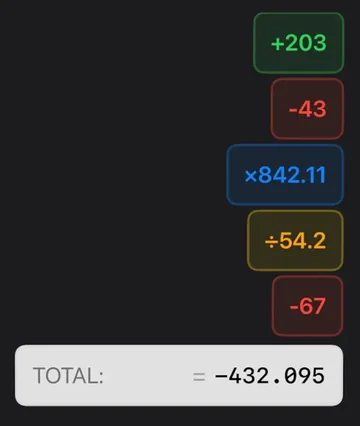
It's free, with no ads. See what to say to the app, or get it on the App Store.
Questions people ask
Is the online voice calculator free?
Yes. There’s no account, no ads and no limit on how many calculations you do.
How do I tell it I’m finished?
Say “done” or “equals”, or tap the button again. If you go quiet for a few seconds, it finishes by itself.
Why is the microphone button gray?
Your browser doesn’t support speech recognition. Firefox is the usual reason. Open the page in Chrome, Edge or Safari, or type the calculation into the box under the microphone instead.
Does it work offline?
Usually not. Most browsers send speech to an online service to turn it into text, so you need a connection. Typed calculations work offline once the page has loaded.
How does it handle percentages?
Like a desk calculator. “200 plus 15 percent” gives 230, “80 minus 25 percent” gives 60, and “15 percent of 200” gives 30.
It heard the wrong number. What now?
Look at the “Heard” line under the answer to see which word was misheard. Say “clear” to start over, or type it in the box instead.

Simple Voice Calculator
for iPhone.
Free on the App Store, with no ads. Works on iPhone, iPad and Apple Watch. Rated 4.6 out of 5 by more than 200 people.
More guides
Try and learn
Use it for