Using Siri as a calculator
Siri is good at one quick question, like “what’s 18 percent of 64?” or “how many grams in 6 ounces?” Where it struggles is anything longer than one step. Here’s what works, what doesn’t, and what to use instead.
Updated · Vito Software, maker of Simple Voice Calculator
On this page
What Siri handles well
Siri is good at one question with one answer. Phrase it as a question and include every number:
- What's 18 percent of 64?
- What's 1,250 divided by 12?
- What's a 20 percent tip on 86 dollars?
- What's the square root of 529?
- How many grams in 6 ounces?
- How much is 40 euros in dollars?
For conversions in particular (units, currency, time zones), Siri is often the quickest option on an iPhone, and Simple Voice Calculator doesn't do conversions at all.
Where Siri stops being useful
There's no running total
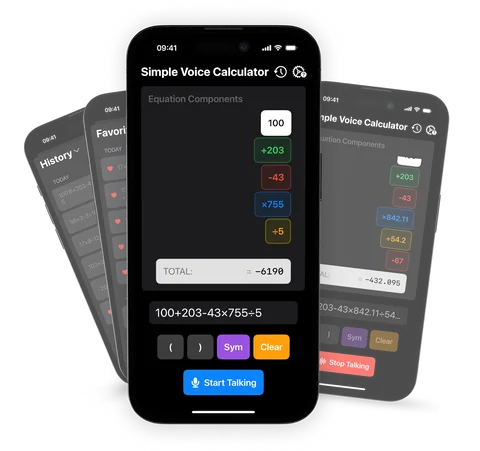
Each request mostly starts from scratch. Ask for "246 plus 18", get 264, then say "plus 12", and Siri usually won't add it to the last answer. You have to repeat the number you just got, which defeats the point when you're working through a list. A voice calculator keeps the total going, and Simple Voice Calculator even keeps it in the Dynamic Island while you read numbers from another app.
Long lists are all or nothing
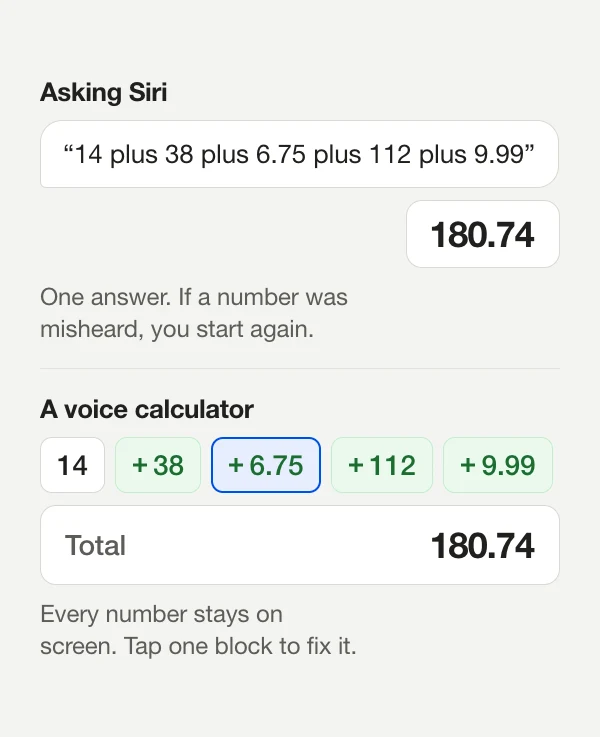
You can say "14 plus 38 plus 6.75 plus 112 plus 9.99" in one go, and if every number is heard right, you'll get the right total. If one is misheard, you can't fix just that number. You see one answer and have to start again. Past five or six numbers, that gets tiresome.
You can't see the steps
Siri shows the answer, sometimes with the expression it understood, but not as something you can check line by line or edit. For money, taxes or anything you'll be held to, being able to see each number matters.
What about the Calculator app?
Apple's Calculator got a lot better in iOS 18. It now has a history list, unit and currency conversion, and Math Notes, where you type an equation followed by "=" and the answer fills itself in. What it doesn't have is a microphone button. To use it by voice you'd need Siri or dictation in a text field, which brings back the problems above.
Side by side
| Task | Siri | Calculator app | Simple Voice Calculator |
|---|---|---|---|
| One quick question | Best option | Type it | Say it |
| Unit or currency conversion | Yes | Yes | No |
| Adding 30 receipts | Hard: one misheard number means starting over | Type all 30 | Read them out, with the total after each |
| Fixing one wrong number | Start again | Backspace or retype | Tap the number's block |
| Hearing the answer | Yes | Only with VoiceOver | YesWith Announce Total |
| Apple Watch | Yes | Yes | Yes |
Swipe the table sideways to see every column.
A sensible setup is Siri for one-off questions and conversions, and a voice calculator for anything with more than three or four numbers.
Using Siri to open Simple Voice Calculator
The app adds a Siri shortcut, so you can skip finding the icon. On your Home Screen the app is called "Voice Calculator", and that's the name Siri listens for. Say any of these:
- Voice calculate with Voice Calculator
- Do some math in Voice Calculator
- Help me with math in Voice Calculator
Pro subscribers go straight into listening mode. On an iPhone with an Action button, you can assign the same shortcut to it under Settings › Action Button › Shortcut, which makes it a one-press voice calculator.
Not sure which phrasing works? Here's the full list, or try the online voice calculator first.
Questions people ask
Can Siri add a list of numbers?
Only if you say the whole list in one breath and Siri hears every number right. You can’t see the numbers as separate pieces or fix one of them, so with a long list it’s often quicker to start again.
Does Siri remember the last answer?
Not reliably. Each question usually starts fresh, so “plus 12” on its own doesn’t add to the answer you just got. Repeat the number: “246 plus 12”.
Can Siri open a voice calculator?
Yes. Say “Voice calculate with Voice Calculator” (that’s the app’s name on the Home Screen). Pro subscribers go straight into listening mode.
Does the iPhone Calculator app have voice input?
No. You can ask Siri a question or use dictation in a text field, but the Calculator app itself has no microphone button.

Simple Voice Calculator
for iPhone.
Free on the App Store, with no ads. Works on iPhone, iPad and Apple Watch. Rated 4.6 out of 5 by more than 200 people.
More guides
Try and learn
Use it for