A talking calculator for iPhone
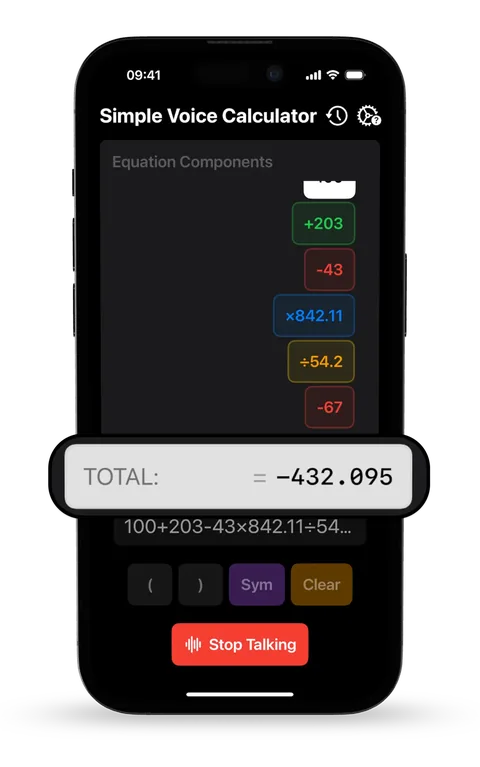
Simple Voice Calculator works in both directions. You say the numbers instead of tapping them, and it reads the total back to you, so you can do a whole calculation without looking at the screen.
Updated · Vito Software, maker of Simple Voice Calculator
On this page
Two kinds of talking calculator
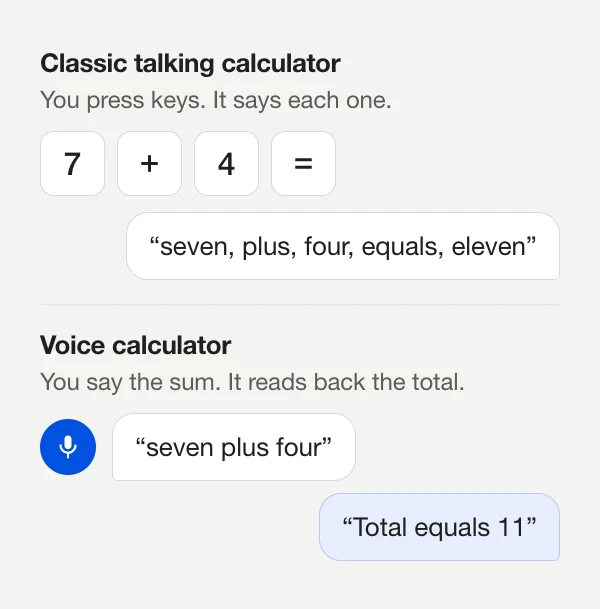
"Talking calculator" usually means one of two things. The classic kind has normal buttons and says each key out loud as you press it: "seven, plus, four, equals, eleven". They've been around since the 1970s, mostly for blind and low-vision users and for classrooms.
The newer kind listens. You say "seven plus four" and it works out the answer. Simple Voice Calculator is this kind, and it can also read the answer back, so the whole calculation can happen without looking at the screen. If you also want every button announced, turn on VoiceOver in iOS. VoiceOver reads the controls, and the app reads the result.
Turning the voice on
Spoken answers are free, but they're off by default, so the app stays quiet if you use it in a meeting or a library.
- Open Simple Voice Calculator and go to Settings.
- Turn on Announce Total.
- Tap the microphone, say your calculation, then say stop. You'll hear "Total equals…" followed by the answer.
- Tap the total any time to hear it again. Press and hold it to copy the number.
The voice speaks in the same language the app listens in: English, German, Spanish, Italian, Korean or Hindi, whichever your iPhone is set to. The Apple Watch app has its own Announce Total switch.
When hearing the answer helps
Checking figures on paper
Bank statements, tax forms, inventory sheets. You read each number out, the app keeps the total, and your finger never leaves the line you're on. People who do this say it's where the app is most useful:
Now I can calculate long sequences without taking my eyes off the data.KGRoberts, App Store review
In the kitchen
Scaling a recipe for more people means a handful of multiplications. With sticky hands, it helps when the phone says "Total equals 375" while you're already reaching for the flour. There's more in the cooking guide.
Low vision
Speaking replaces finding small keys, and hearing replaces reading the result. With VoiceOver on as well, every block of the equation can be read and edited. See the accessibility guide for the full setup.
Classic talking calculator vs. Simple Voice Calculator
| Classic talking calculator | Simple Voice Calculator | |
|---|---|---|
| How you enter numbers | Press keys | Say them, or type |
| What it says | Every key, then the result | The total (with VoiceOver, every control too) |
| Fixing a wrong number | Clear and key it all in again | Tap that number's block to edit or delete it |
| Long lists | One key press per digit | Read the list out loud |
| Apple Watch | Rare | Included, free |
If you want to hear each key as you press it, say for teaching times tables, a classic talking calculator is the right tool. If you'd rather not press keys at all, a voice calculator is.
Try it before you install anything
The online voice calculator on this site listens and talks back in Chrome, Edge and Safari. It's a quick way to see whether doing math out loud works for you. The phrasing that works in the app is listed in what to say.
Questions people ask
How do I make the app say the answer?
Open Settings in Simple Voice Calculator and turn on Announce Total. It’s free. After that, the total is read out every time you stop recording, and you can tap the total to hear it again.
Does it read every button press aloud?
Not by itself. If you need each key announced, turn on VoiceOver in iOS Settings. VoiceOver reads the buttons, and the app’s own announcement reads the result.
Can I change the voice?
The app uses the iPhone’s built-in voice for your language. You can’t pick a different voice or speed inside the app.
Is there a talking calculator I can try without installing anything?
Yes. The free online voice calculator on this site listens and speaks in Chrome, Edge and Safari.

Simple Voice Calculator
for iPhone.
Free on the App Store, with no ads. Works on iPhone, iPad and Apple Watch. Rated 4.6 out of 5 by more than 200 people.
More guides
Try and learn
Use it for