Dynamic Island calculator for iPhone
The iPhone Calculator can’t float over other apps, but you can get close. Start Simple Voice Calculator listening, switch to the app with the numbers, and read them out loud. The running total stays in the Dynamic Island and on the Lock Screen while you work.
Updated · Vito Software, maker of Simple Voice Calculator
On this page

A calculator that stays with you in other apps
On iPhone, the built-in Calculator takes up the whole screen. It can't float over your bank app or a PDF, so adding up numbers from another app means switching back and forth. Every switch is a chance to lose your place or type a number wrong.
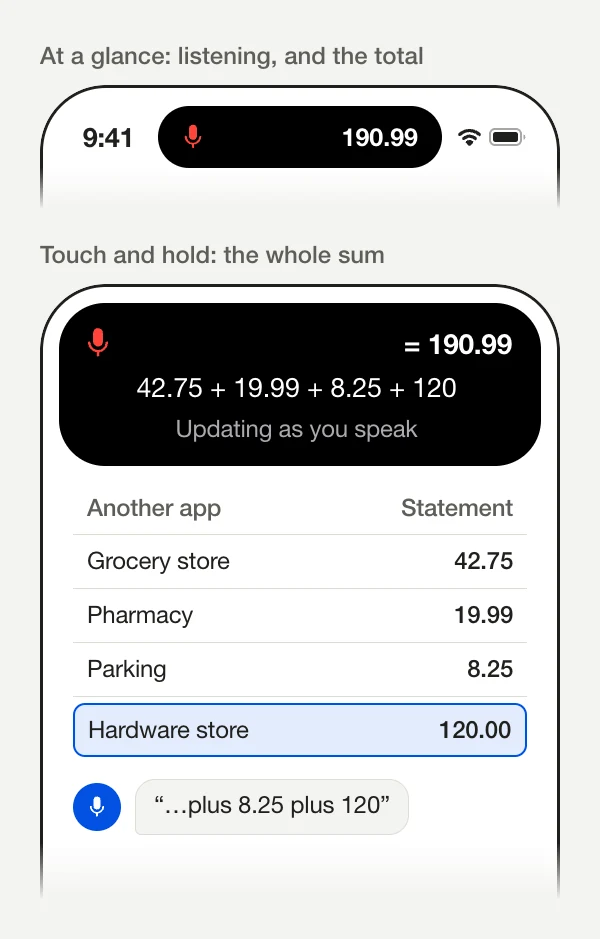
Simple Voice Calculator works the other way around. Start it listening, go to the app with the numbers, and read them out loud. The app keeps listening in the background, and the running total sits in the Dynamic Island at the top of the screen. On iPhones without a Dynamic Island, it shows on the Lock Screen instead.
Just open this app and hit “start speaking”, go to the other app that contains the numbers, and read them out loud! Simple Voice Calculator keeps a running total.Tinakkkkkkkkkkkkkkk, App Store review
How to add up numbers from another app
- Open Simple Voice Calculator and tap the microphone (Start Talking).
- Switch to the app with the numbers: Notes, your bank app, a PDF, a spreadsheet, an email. The app keeps listening.
- Read the numbers out loud, with “plus” between them: 42.75 plus 19.99 plus 8.25 plus 120
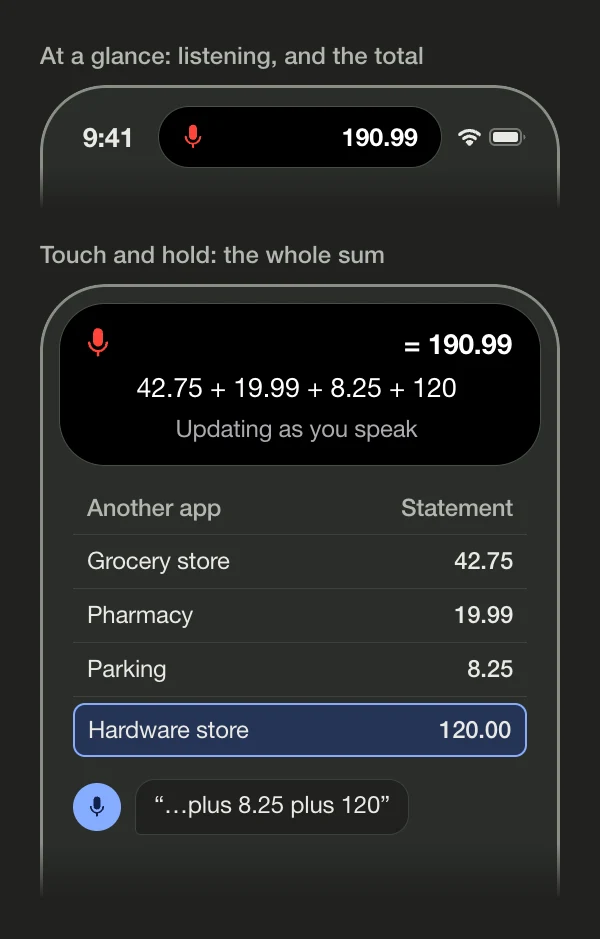
- Glance at the Dynamic Island for the running total. Touch and hold it to see the whole equation.
- When you're done, say stop or done. Or tap the Live Activity to go back to the app, where it's still listening, and tap the microphone to stop.
After you stop, the final total stays up for a few seconds with “Calculation complete”, then goes away. The full equation is waiting in the app, where you can check each number, fix one, or press and hold the total to copy it.
What you see
The same Live Activity shows up in a few places. Here's what each one shows while the app is listening.
| Where | What it shows |
|---|---|
| Dynamic Island | A red microphone on the left and the running total on the right. |
| Dynamic Island, touched and held | The microphone, “=” and the total, the equation with every number, and a status line: “Speak your equation”, then “Updating as you speak”. |
| Sharing the island | When another app's Live Activity is running too, such as a timer, just the red microphone. |
| Lock Screen | A blue card with “Voice Calculator”, a Listening tag, the equation in large type and the total. With nothing to show yet, it reads “Waiting for equation…”. |
| After you stop | A green checkmark instead of the microphone, the final total, and “Calculation complete”. |
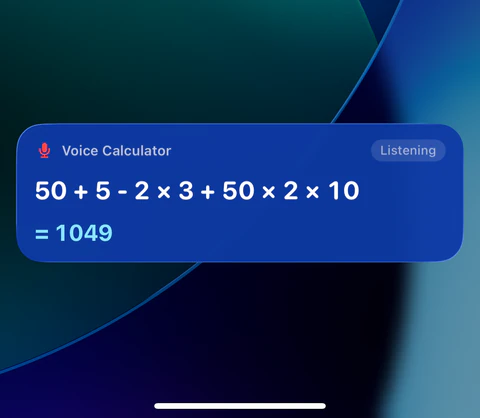
If what it heard doesn't make a valid sum, you'll see “Invalid Equation” instead of a total until you fix it. Tapping the Live Activity anywhere opens the app. It has no buttons of its own.
What you need
- iOS 16.4 or later. The rest of the app runs on iOS 16.0, but the Live Activity needs 16.4.
- A Dynamic Island, or not. The Dynamic Island is the pill-shaped cutout at the top of the screen on iPhone 14 Pro, 14 Pro Max and most newer iPhones. On an iPhone with a notch, including iPhone 16e, the Live Activity shows on the Lock Screen and in Notification Center. Swipe down from the top of the screen to check the total, then swipe up to go back.
- The setting turned on. In Simple Voice Calculator, go to Settings and check that Live Activity While Recording is on. It's on by default. Live Activities also need to be allowed for the app in the iPhone Settings app, which they are unless you've turned them off.
- Nothing extra. The Live Activity is part of the free app, with no ads. Pro isn't needed for it.
Good uses for it
Bank and card statements
Scroll through a month of transactions in your bank app and total one category, like groceries or gas.
Invoices and PDFs
Check the total on an invoice or a quote by reading each line item from the PDF.
Spreadsheets on your phone
Add up a column someone sent you without writing a formula or copying cells.
Lists in Notes and messages
Expenses from a trip, a shopping list with prices, the amounts a friend texted you.
Tips
- Say “plus” between every number. Without it, two numbers can run together into one.
- Scroll as much as you like. Scrolling, switching apps and locking the screen don't stop it listening.
- A phone call ends the session. So can another app that needs the microphone. The total so far stays in the app. When you start again, new numbers are added to the end of the same equation, so begin with plus.
- Check long lists in the app. Every 20 numbers or so, tap the Live Activity, look over the blocks, and delete any that were misheard. It keeps listening while you do.
For the exact words the app understands, see what to say. For receipts and paperwork on your desk, see adding long lists. You can try voice math in the online voice calculator too, though a browser page can't keep listening once you leave it.
Questions people ask
Can I use Simple Voice Calculator while I’m in another app?
Yes. Tap the microphone, then switch apps. It keeps listening in the background, and the running total shows in the Dynamic Island and on the Lock Screen. Say “stop” when you’re done.
Is there a floating calculator for iPhone?
The built-in Calculator can’t float over other apps. The closest thing is a Live Activity: Simple Voice Calculator keeps the running total in the Dynamic Island while you read numbers from another app.
Do I need an iPhone with a Dynamic Island?
No. On an iPhone with a notch, the same Live Activity shows on the Lock Screen and in Notification Center. You need iOS 16.4 or later.
Is the Live Activity free?
Yes. It’s part of the free app, with no ads. Pro adds History, Favorites and iCloud sync, and isn’t needed for this.
How do I stop recording from another app?
Say “stop” or “done”. Or tap the Live Activity to open the app, then tap the microphone. The Live Activity has no buttons of its own.

Simple Voice Calculator
for iPhone.
Free on the App Store, with no ads. Works on iPhone, iPad and Apple Watch. Rated 4.6 out of 5 by more than 200 people.
More guides
Try and learn
Use it for